

Creating a home workspace that is both organized and productive can significantly improve your work-from-home experience. Whether you are telecommuting full-time or occasionally working remotely, having a dedicated and well-arranged area helps foster focus, reduce distractions, and maintain a healthy work-life balance. This guide offers practical tips to help you design a home workspace that supports your productivity while feeling comfortable and inspiring.
Choose the Right Location
Your workspace location influences your comfort and focus. Ideally, pick a quiet area separated from everyday household traffic if possible. Here are some factors to consider:
– Natural Light: Position your desk near a window to benefit from natural light, which can enhance mood and reduce eye strain.
– Minimal Noise: Choose a spot away from noisy appliances, televisions, or busy common areas.
– Space Availability: Ensure there is enough space for your desk, chair, and storage without feeling cramped.
– Ventilation: Good airflow keeps the area comfortable throughout the day.
If space is limited, even a small corner in a room can serve as a dedicated workspace with the right setup.
Invest in Comfortable and Ergonomic Furniture
Long hours at your desk require furniture that supports your body and promotes good posture.
– Ergonomic Chair: Select a chair with adjustable height, lumbar support, and comfortable cushioning to reduce back and neck strain.
– Appropriate Desk Height: Your desk should allow your arms to rest comfortably at a 90-degree angle while typing.
– Adjustable Desk Options: Consider standing desks or adjustable desks that allow you to alternate between sitting and standing for improved circulation.
– Monitor Placement: Position your computer screen at eye level to avoid neck discomfort.
Comfortable and ergonomic furniture helps prevent fatigue and physical discomfort, letting you work longer with greater focus.
Declutter and Organize Your Workspace
A clutter-free workspace reduces distractions and saves time searching for supplies. Here are ways to keep your space tidy:
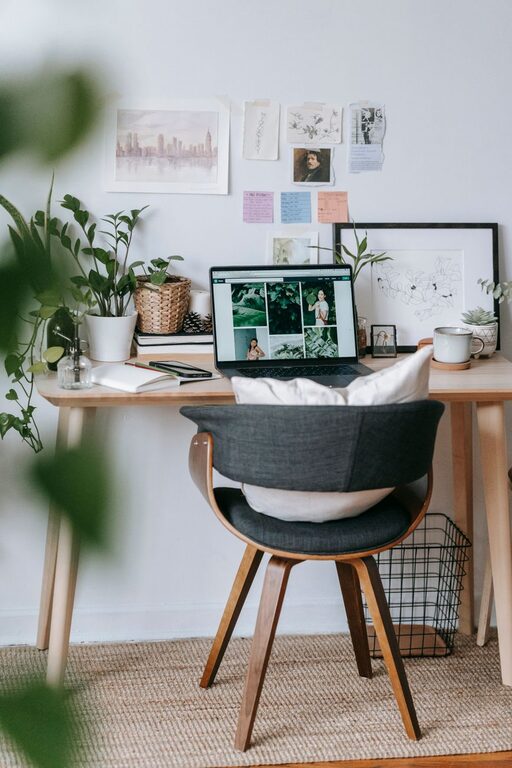
– Limit Desk Items: Keep only essential items on your desk, such as your computer, keyboard, mouse, and frequently used stationery.
– Use Storage Solutions: Utilize drawers, shelves, or filing cabinets to store documents, office supplies, and electronics.
– Cable Management: Use cable organizers or clips to prevent cords from tangling and creating a messy environment.
– Regular Cleaning: Set aside time each day or week to tidy up your workspace and wipe surfaces.
An organized desk reflects an organized mind, helping you stay focused and motivated.
Optimize Lighting for Productivity
Proper lighting minimizes eye strain and keeps you alert.
– Combine Natural and Artificial Light: Use a mix of daylight and task lighting to reduce glare and shadows.
– Desk Lamps: Invest in adjustable desk lamps with brightness controls to customize lighting based on the time of day or task.
– Avoid Screen Glare: Position screens perpendicular to windows or light sources to prevent reflections.
Good lighting creates a comfortable atmosphere that supports long working hours.
Personalize Your Workspace for Inspiration
Adding personal touches can make your workspace inviting and inspire creativity.
– Decorative Items: Include plants, photos, or artwork that uplift your mood.
– Color Choices: Choose calming or motivating colors for your walls or accessories.
– Scent and Sound: Use essential oils or soft background music to enhance focus and reduce stress.
Personalization helps build an enjoyable and motivating environment.
Establish a Routine and Minimize Distractions
Even the best workspace can’t fix inconsistent habits. Develop routines and minimize interruptions for maximum productivity.
– Set Work Hours: Stick to scheduled start and end times to balance work and personal life.
– Use Noise-Canceling Headphones: Block out background noise to maintain concentration.
– Communicate Boundaries: Inform household members about your work schedule to reduce interruptions.
– Limit Digital Distractions: Use apps or browser extensions that block distracting websites during working hours.
Consistency and focus behaviors complement your workspace arrangement.
Maintain Good Posture and Take Breaks
Your workspace setup encourages good posture, but remember to move regularly.
– Follow the 20-20-20 Rule: Every 20 minutes, look at something 20 feet away for 20 seconds to reduce eye strain.
– Stretch and Move: Stand up, stretch, or take short walks to stimulate blood flow and refresh your mind.
– Adjust Seating Position: Sit with both feet flat on the floor and avoid slouching.
Regular movement and good posture prevent discomfort and increase productivity.
Use Technology to Your Advantage
Leverage technology for an efficient home office.
– Cloud Storage: Keep important files accessible from anywhere and backed up.
– Task Management Tools: Use apps to organize tasks, deadlines, and priorities.
– Communication Platforms: Facilitate smooth collaboration with video conferencing and messaging apps.
– Wireless Devices: Reduce clutter by opting for wireless keyboards, mice, and printers.
Smart technology choices streamline your workflow and reduce frustration.
—
Creating an organized and productive home workspace is a combination of thoughtful design, disciplined habits, and personalized touches. By choosing the right location, investing in ergonomic furniture, keeping your area tidy, optimizing lighting, and managing distractions, you set yourself up for success when working from home. Regularly evaluate your setup and routines to ensure they continue to meet your productivity and comfort needs.